
Una guía paso a paso para construir un tokenizador de subpalabras multilingüe tailandés basado en un algoritmo BPE entrenado en conjuntos de datos tailandeses e ingleses utilizando solo Python

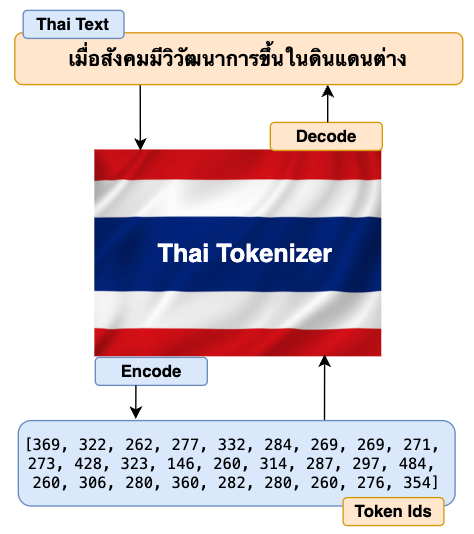
La tarea principal de la Tokenizador es traducir los textos de entrada sin procesar (tailandés en nuestro caso, pero puede estar en cualquier idioma extranjero) a números y pasarlos a los transformadores del modelo. El transformador del modelo luego genera la salida como números. Nuevamente, Tokenizador traduce estos números a textos que los usuarios finales pueden entender. El diagrama de alto nivel que aparece a continuación describe el flujo explicado anteriormente.
En general, a muchos de nosotros solo nos interesa aprender cómo funciona la arquitectura del transformador del modelo en profundidad. A menudo pasamos por alto el aprendizaje detallado de algunos componentes importantes, como los tokenizadores. Comprender cómo funciona el tokenizador en profundidad y tener un buen control de sus funcionalidades nos brinda una buena ventaja para mejorar la precisión y el rendimiento de nuestro modelo.
De manera similar a Tokenizer, algunos de los componentes más importantes de los procesos de implementación de LLM son el preprocesamiento de datos, la evaluación, las barreras de seguridad y las pruebas y el monitoreo. Recomiendo encarecidamente que estudie más detalles sobre estos temas. Me di cuenta de la importancia de estos componentes recién después de trabajar en la implementación real de mi modelo multilingüe básico ThaiLLM en producción.
¿Por qué necesitas un tokenizador tailandés o de cualquier otro idioma extranjero?
- Supongamos que está utilizando tokenizadores genéricos basados en inglés para entrenar previamente un modelo de lenguaje grande y multilingüe como tailandés, hindi, indonesio, árabe, chino, etc. En ese caso, es probable que su modelo no brinde un resultado adecuado que tenga sentido para su dominio específico o casos de uso. Por lo tanto, crear su propio tokenizador en el lenguaje que elija sin duda ayuda a que el resultado de su modelo sea mucho más coherente y comprensible.
- La creación de su propio tokenizador también le otorga un control total sobre el vocabulario completo e inclusivo que desea crear. Durante el mecanismo de atención, debido al vocabulario completo, el token puede prestar atención y aprender de más tokens dentro de la longitud de contexto limitada de la secuencia. Por lo tanto, hace que el aprendizaje sea más coherente, lo que finalmente ayuda a una mejor inferencia del modelo.
La buena noticia es que, una vez que hayas terminado de crear Thai Tokenizer, podrás crear fácilmente un tokenizador en cualquier otro idioma. Todos los pasos de creación son los mismos, excepto que tendrás que entrenar en el conjunto de datos del idioma que elijas.
Ahora que tenemos buenas razones para crear nuestro propio tokenizador, a continuación se muestran los pasos para crear nuestro tokenizador en idioma tailandés.
- Construyamos nuestro propio algoritmo BPE
- Entrenar al tokenizador
- Función de codificación y decodificación del tokenizador
- Cargar y probar el tokenizador
Paso 1: Construir nuestro propio algoritmo BPE (codificación de pares de bytes):
El algoritmo BPE se utiliza en muchos LLM populares, como Llama, GPT y otros, para crear su tokenizador. Podemos elegir uno de estos tokenizadores LLM si nuestro modelo se basa en el idioma inglés. Dado que estamos creando el tokenizador tailandés, la mejor opción es crear nuestro propio algoritmo BPE desde cero y usarlo para crear nuestro tokenizador. Primero, comprendamos cómo funciona el algoritmo BPE con la ayuda del diagrama de flujo simple que se muestra a continuación y luego comenzaremos a crearlo en consecuencia.
Los ejemplos en el diagrama de flujo se muestran en inglés para facilitar su comprensión.
Escribamos código para implementar el algoritmo BPE para nuestro tokenizador tailandés.
# A simple practice example to get familiarization with utf-8 encoding to convert strings to bytes.
text = "How are you คุณเป็นอย่างไร"      # Text string in both English and Thai
text_bytes = text.encode("utf-8")
print(f"Text in byte: {text_bytes}")text_list = list(text_bytes)          # Converts text bytes to a list of integer
print(f"Text list in integer: {text_list}")
# As I don't want to reinvent the wheel, I will be referencing most of the code block from Andrej Karpathy's GitHub (https://github.com/karpathy/minbpe?tab=readme-ov-file).
# However, I'll be modifying code blocks specific to building our Thai language tokenizer and also explaining the codes so that you can understand how each code block works and make it easy when you implement code for your use case later.# This module provides access to the Unicode Character Database (UCD) which defines character properties for all Unicode characters.
import unicodedata
# This function returns a dictionary with consecutive pairs of integers and their counts in the given list of integers.
def get_stats(ids, stats=None):
stats = {} if stats is None else stats
# zip function allows to iterate consecutive items from given two list
for pair in zip(ids, ids[1:]):
# If a pair already exists in the stats dictionary, add 1 to its value else assign the value as 0.
stats[pair] = stats.get(pair, 0) + 1
return stats
# Once we find out the list of consecutive pairs of integers, we'll then replace those pairs with new integer tokens.
def merge(ids, pair, idx):
newids = []
i = 0
# As we'll be merging a pair of ids, hence the minimum id in the list should be 2 or more.
while i < len(ids):
# If the current id and next id(id+1) exist in the given pair, and the position of id is not the last, then replace the 2 consecutive id with the given index value.
if ids[i] == pair[0] and i < len(ids) - 1 and ids[i+1] == pair[1]:
newids.append(idx)
i += 2 # If the pair is matched, the next iteration starts after 2 positions in the list.
else:
newids.append(ids[i])
i += 1 # Since the current id pair didn't match, so start iteration from the 1 position next in the list.
# Returns the Merged Ids list
return newids
# This function checks that using 'unicodedata.category' which returns "C" as the first letter if it is a control character and we'll have to replace it readable character.
def replace_control_characters(s: str) -> str:
chars = []
for ch in s:
# If the character is not distorted (meaning the first letter doesn't start with "C"), then append the character to chars list.
if unicodedata.category(ch)[0] != "C":
chars.append(ch)
# If the character is distorted (meaning the first letter has the letter "C"), then replace it with readable bytes and append to chars list.
else:
chars.append(f"\\u{ord(ch):04x}")
return "".join(chars)
# Some of the tokens such as control characters like Escape Characters can't be decoded into valid strings.
# Hence those need to be replace with readable character such as �
def render_token(t: bytes) -> str:
s = t.decode('utf-8', errors='replace')
s = replace_control_characters(s)
return s
Las dos funciones obtener_estadísticas y unir Lo que se definió anteriormente en el bloque de código es la implementación del algoritmo BPE para nuestro tokenizador tailandés. Ahora que el algoritmo está listo, escribamos el código para entrenar nuestro tokenizador.
Paso 2: Entrenar el tokenizador:
El entrenamiento del tokenizador implica generar un vocabulario que es una base de datos de tokens únicos (palabras y subpalabras) junto con un número de índice único asignado a cada token. Usaremos El conjunto de datos de Wiki en tailandés de Hugging Face para entrenar a nuestro Tokenizador tailandés. Al igual que entrenar un LLM requiere una gran cantidad de datos, también necesitará una buena cantidad de datos para entrenar un tokenizador. También podría usar el mismo conjunto de datos para entrenar el LLM y el tokenizador, aunque no es obligatorio. Para un LLM multilingüe, es recomendable usar los conjuntos de datos en inglés y tailandés en una proporción de 2:1, que es un enfoque estándar que siguen muchos profesionales.
Comencemos a escribir el código de entrenamiento.
# Import Regular Expression
import regex as re # Create a Thai Tokenizer class.
class ThaiTokenizer():
def __init__(self):
# The byte pair should be done within the related words or sentences that give a proper context. Pairing between unrelated words or sentences may give undesirable output.
# To prevent this behavior, we'll implement the LLama 3 regular expression pattern to make meaningful chunks of our text before implementing the byte pair algorithm.
self.pattern = r"(?i:'s|'t|'re|'ve|'m|'ll|'d)|[^\r\n\p{L}\p{N}]?\p{L}+|\p{N}{1,3}| ?[^\s\p{L}\p{N}]+[\r\n]*|\s*[\r\n]+|\s+(?!\S)|\s+"
self.compiled_pattern = re.compile(self.pattern)
# Special tokens are used to provide coherence in the sequence while training.
# Special tokens are assigned a unique index number and stored in vocabulary.
self.special_tokens = {
'<|begin_of_text|>': 1101,
'<|end_of_text|>': 1102,
'<|start_header_id|>': 1103,
'<|end_header_id|>': 1104,
'<|eot_id|>': 1105
}
# Initialize merges with empty dictionary
self.merges = {}
# Initialize the vocab dictionary by calling the function _build_vocab which is defined later in this class.
self.vocab = self._build_vocab()
# Tokenizer training function
def train(self, text, vocab_size):
# Make sure the vocab size must be at least 256 as the utf-8 encoding for the range 0-255 are same as the Ascii character.
assert vocab_size >= 256
# Total number of merges into the vocabulary.
num_merges = vocab_size - 256
# The first step is to make sure to split the text up into text chunks using the pattern defined above.
text_chunks = re.findall(self.compiled_pattern, text)
# Each text_chunks will be utf-8 encoded to bytes and then converted into an integer list.
ids = [list(ch.encode("utf-8")) for ch in text_chunks]
# Iteratively merge the most common pairs to create new tokens
merges = {} # (int, int) -> int
vocab = {idx: bytes([idx]) for idx in range(256)} # idx -> bytes
# Until the total num_merges is reached, find the common pair of consecutive id in the ids list and start merging them to create a new token
for i in range(num_merges):
# Count the number of times every consecutive pair appears
stats = {}
for chunk_ids in ids:
# Passing in stats will update it in place, adding up counts
get_stats(chunk_ids, stats)
# Find the pair with the highest count
pair = max(stats, key=stats.get)
# Mint a new token: assign it the next available id
idx = 256 + i
# Replace all occurrences of pair in ids with idx
ids = [merge(chunk_ids, pair, idx) for chunk_ids in ids]
# Save the merge
merges[pair] = idx
vocab[idx] = vocab[pair[0]] + vocab[pair[1]]
# Save class variables to be used later during tokenizer encode and decode
self.merges = merges
self.vocab = vocab
# Function to return a vocab dictionary combines with merges and special tokens
def _build_vocab(self):
# The utf-8 encoding for the range 0-255 are same as the Ascii character.
vocab = {idx: bytes([idx]) for idx in range(256)}
# Iterate through merge dictionary and add into vocab dictionary
for (p0, p1), idx in self.merges.items():
vocab[idx] = vocab[p0] + vocab[p1]
# Iterate through special token dictionary and add into vocab dictionary
for special, idx in self.special_tokens.items():
vocab[idx] = special.encode("utf-8")
return vocab
# After training is complete, use the save function to save the model file and vocab file.
# Model file will be used to load the tokenizer model for further use in llm
# Vocab file is just for the purpose of human verification
def save(self, file_prefix):
# Writing to model file
model_file = file_prefix + ".model" # model file name
# Model write begins
with open(model_file, 'w') as f:
f.write("thai tokenizer v1.0\n") # write the tokenizer version
f.write(f"{self.pattern}\n") # write the pattern used in tokenizer
f.write(f"{len(self.special_tokens)}\n") # write the length of special tokens
# Write each special token in the specific format like below
for tokens, idx in self.special_tokens.items():
f.write(f"{tokens} {idx}\n")
# Write only the keys part from the merges dict
for idx1, idx2 in self.merges:
f.write(f"{idx1} {idx2}\n")
# Writing to the vocab file
vocab_file = file_prefix + ".vocab" # vocab file name
# Change the position of keys and values of merge dict and store into inverted_merges
inverted_merges = {idx: pair for pair, idx in self.merges.items()}
# Vocab write begins
with open(vocab_file, "w", encoding="utf-8") as f:
for idx, token in self.vocab.items():
# render_token function processes tokens and prevents distorted bytes by replacing them with readable character
s = render_token(token)
# If the index of vocab is present in merge dict, then find its child index, convert their corresponding bytes in vocab dict and write the characters
if idx in inverted_merges:
idx0, idx1 = inverted_merges[idx]
s0 = render_token(self.vocab[idx0])
s1 = render_token(self.vocab[idx1])
f.write(f"[{s0}][{s1}] -> [{s}] {idx}\n")
# If index of vocab is not present in merge dict, just write it's index and the corresponding string
else:
f.write(f"[{s}] {idx}\n")
# Function to load tokenizer model.
# This function is invoked only after the training is complete and the tokenizer model file is saved.
def load(self, model_file):
merges = {} # Initialize merge and special_tokens with empty dict
special_tokens = {} # Initialize special_tokens with empty dict
idx = 256 # As the range (0, 255) is already reserved in vocab. So the next index only starts from 256 and onwards.
# Read model file
with open(model_file, 'r', encoding="utf-8") as f:
version = f.readline().strip() # Read the tokenizer version as defined during model file writing
self.pattern = f.readline().strip() # Read the pattern used in tokenizer
num_special = int(f.readline().strip()) # Read the length of special tokens
# Read all the special tokens and store in special_tokens dict defined earlier
for _ in range(num_special):
special, special_idx = f.readline().strip().split()
special_tokens[special] = int(special_idx)
# Read all the merge indexes from the file. Make it a key pair and store it in merge dictionary defined earlier.
# The value of this key pair would be idx(256) as defined above and keep on increase by 1.
for line in f:
idx1, idx2 = map(int, line.split())
merges[(idx1, idx2)] = idx
idx += 1
self.merges = merges
self.special_tokens = special_tokens
# Create a final vocabulary dictionary by combining merge, special_token and vocab (0-255). _build_vocab function helps to do just that.
self.vocab = self._build_vocab()
Paso 3: Función de codificación y decodificación del tokenizador:
- Codificación del tokenizador: La función de codificación del tokenizador analiza el vocabulario y traduce los textos de entrada o las indicaciones en una lista de identificadores enteros. Estos identificadores se introducen luego en los bloques del transformador.
- Descodificación del tokenizador: La función de decodificación del tokenizador analiza el vocabulario y traduce la lista de identificaciones generadas a partir del bloque clasificador del transformador en textos de salida.
Echemos un vistazo al diagrama a continuación para tener mayor claridad.
Escribamos código para implementar la función de codificación y decodificación del tokenizador.
# Tokenizer encode function takes text as a string and returns integer ids list
def encode(self, text): # Define a pattern to identify special token present in the text
special_pattern = "(" + "|".join(re.escape(k) for k in self.special_tokens) + ")"
# Split special token (if present) from the rest of the text
special_chunks = re.split(special_pattern, text)
# Initialize empty ids list
ids = []
# Loop through each of parts in the special chunks list.
for part in special_chunks:
# If the part of the text is the special token, get the idx of the part from the special token dictionary and append it to the ids list.
if part in self.special_tokens:
ids.append(self.special_tokens[part])
# If the part of text is not a special token
else:
# Split the text into multiple chunks using the pattern we've defined earlier.
text_chunks = re.findall(self.compiled_pattern, text)
# All text chunks are encoded separately, then the results are joined
for chunk in text_chunks:
chunk_bytes = chunk.encode("utf-8") # Encode text to bytes
chunk_ids = list(chunk_bytes) # Convert bytes to list of integer
while len(chunk_ids) >= 2: # chunks ids list must be at least 2 id to form a byte-pair
# Count the number of times every consecutive pair appears
stats = get_stats(chunk_ids)
# Some idx pair might be created with another idx in the merge dictionary. Hence we'll find the pair with the lowest merge index to ensure we cover all byte pairs in the merge dict.
pair = min(stats, key=lambda p: self.merges.get(p, float("inf")))
# Break the loop and return if the pair is not present in the merges dictionary
if pair not in self.merges:
break
# Find the idx of the pair present in the merges dictionary
idx = self.merges[pair]
# Replace the occurrences of pair in ids list with this idx and continue
chunk_ids = merge(chunk_ids, pair, idx)
ids.extend(chunk_ids)
return ids
# Tokenizer decode function takes a list of integer ids and return strings
def decode(self, ids):
# Initialize empty byte list
part_bytes = []
# Change the position of keys and values of special_tokens dict and store into inverse_special_tokens
inverse_special_tokens = {v: k for k, v in self.special_tokens.items()}
# Loop through idx in the ids list
for idx in ids:
# If the idx is found in vocab dict, get the bytes of idx and append them into part_bytes list
if idx in self.vocab:
part_bytes.append(self.vocab[idx])
# If the idx is found in inverse_special_tokens dict, get the token string of the corresponding idx, convert it to bytes using utf-8 encode and then append it into part_bytes list
elif idx in inverse_special_tokens:
part_bytes.append(inverse_special_tokens[idx].encode("utf-8"))
# If the idx is not found in both vocab and special token dict, throw an invalid error
else:
raise ValueError(f"invalid token id: {idx}")
# Join all the individual bytes from the part_byte list
text_bytes = b"".join(part_bytes)
# Convert the bytes to text string using utf-8 decode function. Make sure to use "errors=replace" to replace distorted characters with readable characters such as �.
text = text_bytes.decode("utf-8", errors="replace")
return text
Paso 4: Cargue y pruebe el tokenizador:
Por último, llega la mejor parte de este artículo. En esta sección realizaremos dos tareas interesantes.
- Primero, entrena nuestro tokenizador con el conjunto de datos de Thai Wiki de Hugging Face. Hemos elegido un tamaño de conjunto de datos pequeño (2,2 MB) para que el entrenamiento sea más rápido. Sin embargo, para una implementación en el mundo real, debes elegir un conjunto de datos mucho más grande para obtener mejores resultados. Una vez que se complete el entrenamiento, guardaremos el modelo.
- En segundo lugar, cargaremos el modelo de tokenizador guardado y realizaremos pruebas de la función de codificación y decodificación del tokenizador.
Vamos a sumergirnos en ello.
# Train the tokenizerimport time # To caculate the duration of training completion
# Load training raw text data (thai_wiki dataset) from huggingface. thai_wiki_small.text: https://github.com/tamangmilan/thai_tokenizer
texts = open("/content/thai_wiki_small.txt", "r", encoding="utf-8").read()
texts = texts.strip()
# Define vocab size
vocab_size = 512
# Initialize a tokenizer model class
tokenizer = ThaiTokenizer()
# Start train a tokenizer
start_time = time.time()
tokenizer.train(texts, vocab_size)
end_time = time.time()
# Save tokenizer: you can change path and filename.
tokenizer.save("./models/thaitokenizer")
print(f"Total time to complete tokenizer training: {end_time-start_time:.2f} seconds")
# Output: Total time to complete tokenizer training: 186.11 seconds (3m 6s) [Note: Training duration will be longer if vocab_size is bigger and lesser for smaller vocab_size]
# Test the tokenizer# Initialize a tokenizer model class
tokenizer = ThaiTokenizer()
# Load tokenizer model. This model was saved during training.
tokenizer.load("./models/thaitokenizer.model")
# Invoke and verify the tokenizer encode and decode function for English Language
eng_texts = "When society evolved in different lands"
print(f"English Text: {eng_texts}")
encoded_ids = tokenizer.encode(eng_texts)
print(f"Encoded Ids: {encoded_ids}")
decoded_texts = tokenizer.decode(encoded_ids)
print(f"Decoded Texts: {decoded_texts}\n")
# Invoke and verify the tokenizer encode and decode function for Thai Language
thai_texts = "เมื่อสังคมมีวิวัฒนาการขึ้นในดินแดนต่าง"
print(f"Thai Text: {thai_texts}")
thai_encoded_ids = tokenizer.encode(thai_texts)
print(f"Encoded Ids: {thai_encoded_ids}")
thai_decoded_texts = tokenizer.decode(thai_encoded_ids)
print(f"Decoded Texts: {thai_decoded_texts}")
Perfecto. Nuestro Tokenizador tailandés ahora puede codificar y decodificar textos en tailandés e inglés de manera correcta y precisa.
¿Has notado que los identificadores codificados para textos en inglés son más largos que los identificadores codificados en tailandés? Esto se debe a que solo hemos entrenado nuestro tokenizador con el conjunto de datos tailandés. Por lo tanto, el tokenizador solo puede crear un vocabulario completo para el idioma tailandés. Como no lo hemos entrenado con un conjunto de datos en inglés, el tokenizador tiene que codificar directamente desde el nivel de caracteres, lo que da como resultado identificadores codificados más largos. Como mencioné antes, para LLM multilingüe, debes entrenar los conjuntos de datos en inglés y tailandés con una proporción de 2:1. Esto te dará resultados equilibrados y de calidad.
¡Y eso es todo! Hemos creado con éxito nuestro propio tokenizador tailandés desde cero utilizando únicamente Python. Y creo que fue genial. Con esto, puedes crear fácilmente un tokenizador para cualquier idioma extranjero. Esto te dará mucha ventaja al implementar tu LLM multilingüe.
¡Muchas gracias por leer!
Enlace al cuaderno de Google Colab
Referencias
[1] Andrej Karpathy, Git Hub: Karpthy/minbpe